
Find Your Best Podcast Clips in Minutes, Not Hours
An AI skill that reads the whole transcript and hands you the clips worth cutting.

Reads a full podcast transcript and hands back the strongest short clips and 8 to 10 minute YouTube blocks, ranked, each with a timestamp, hook and caption.
Any AI that reads a SKILL.md file: Claude, Claude Code, Cursor or Codex. No account, no API key, no install, just paste your transcript.
Works with







Scrubbing a two-hour episode for the three moments worth posting is the slowest part of podcasting. Podcast Clip Finder reads the full transcript and returns the strongest short clips and 8 to 10 minute YouTube blocks, each with a timestamp, a hook, a caption and a ranking. Built for podcast editors, creators and agencies who repurpose episodes at scale.
- A ranked shortlist of the best short clips for Reels, TikTok and Shorts, with exact in and out timestamps.
- The strongest 8 to 10 minute continuous blocks for YouTube, each scored 0 to 10.
- A hook and a ready-to-post caption for every clip.
- The reason each pick will travel: story, authority, curiosity, hot take or emotion.
- A closing call on the single strongest clip and block to publish first.
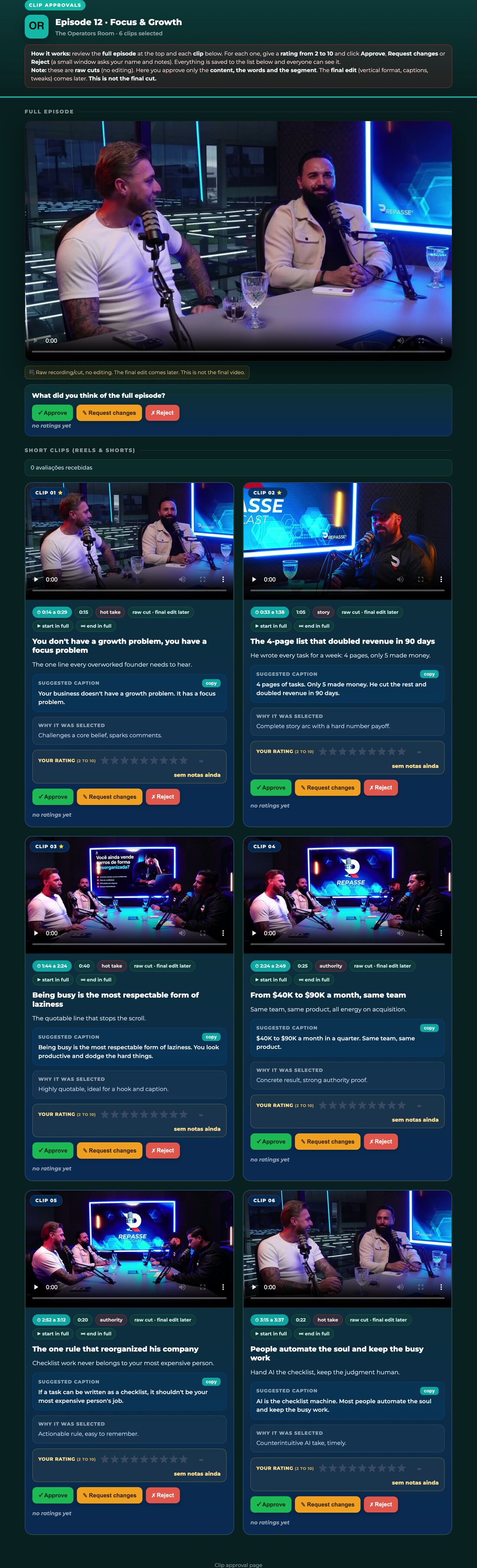
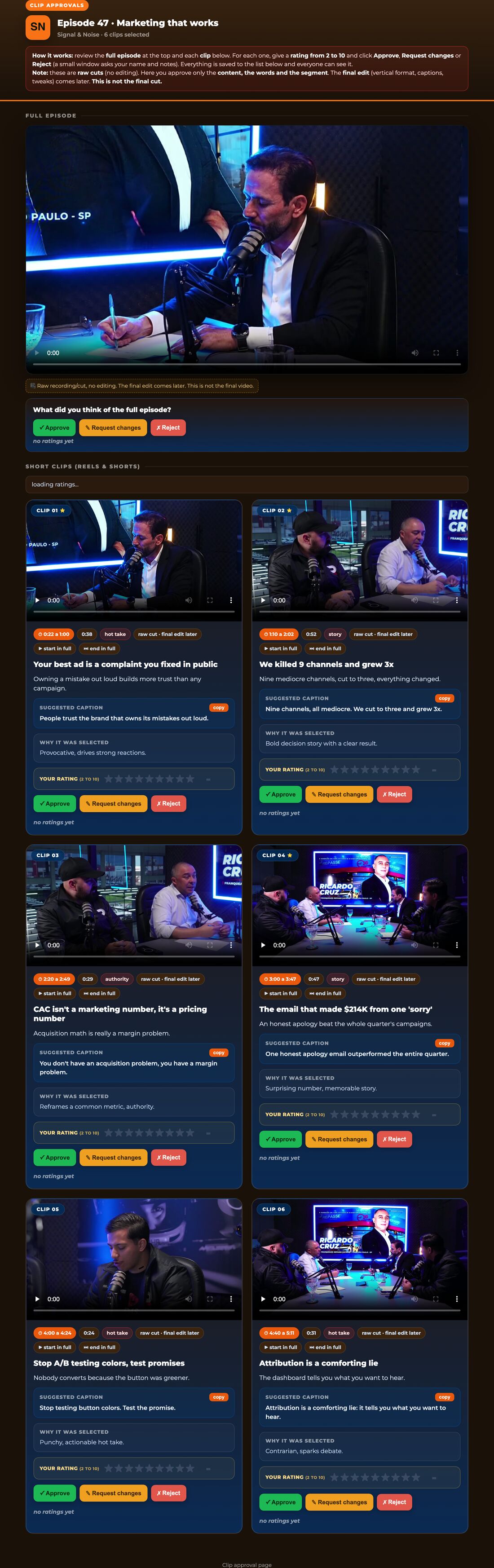
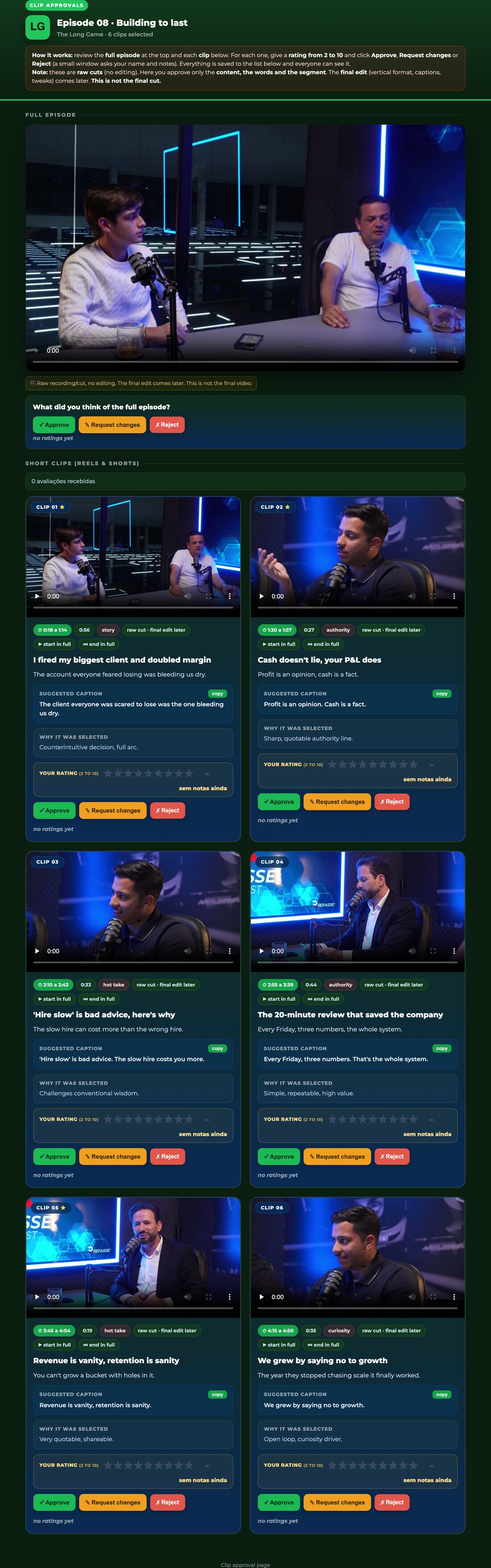
- A self-contained review page to watch, rate 2 to 10 and approve every cut, hosted and saved wherever you choose.
- 1Drop it into your AI
Put the SKILL.md file in your skills folder (Claude Code, Cursor, Codex) or paste it as a custom instruction. No app, no account, no API key, no install.
- 2Paste your transcript
Give it the full episode transcript, timestamps recommended. Nothing external to connect. If you forget it, the AI asks for it first, it never invents.
- 3It reads the whole episode
It reads everything before choosing. It selects and ranks, never summarizes, never invents a quote, and cuts only on clean sentence boundaries, never mid-word.
- 4It finds the short clips
Every standalone moment (story, authority insight, curiosity loop, hot take or emotion) becomes a 15 to 110 second clip, with the top 3 to 4 flagged as viral bets.
- 5It finds the YouTube long blocks
Continuous 8 to 10 minute windows that pass eight rules (one topic arc, strong hook, self-sufficient, full payoff inside, dense throughout, an emotional peak, a quotable line, monetization-safe), each scored 0 to 10.
- 6You get a ready-to-cut shortlist
Both lists with exact timestamps, hooks, captions and a ranking, plus a call on the single strongest clip and block to publish first, ready to hand to an editor.
- 7It builds a review page
A self-contained page (one HTML file) where you or your client watch each cut, rate it 2 to 10 and Approve, Request changes or Reject.
- 8You choose where it lives
It asks where to host the page and where to save the approvals, and wires itself to your setup, on an agentic AI it can even cut the clips with ffmpeg. Nothing hardcoded, no lock-in.
- Short-clip shortlist (15 to 110s): number, START to END, duration, subject, hook, caption, why it travels.
- Top viral bets flagged (the 3 to 4 strongest short clips).
- YouTube long-block list (8 to 10 min): number, window, duration, score /10, hook, 3 title options, thumbnail moment, mid-roll point, summary, risk flags.
- A closing note: the single strongest clip, the strongest block, and what to publish first.
- A self-contained review page (one HTML file): full episode on top, every cut with a player, a 2 to 10 rating and Approve / Request changes / Reject.
Short clips
15 to 110 second cuts for Reels, TikTok and Shorts, with the top viral bets flagged.
YouTube long blocks
Continuous 8 to 10 minute windows for a cuts channel, scored, titled and with a thumbnail moment.
SKILL.md · README.txt · LICENSE.txt — Single-seat commercial use. Do not resell or redistribute the file. Compatible with Claude · Claude Code · Cursor · Codex.
What is a podcast clip finder?
A tool that scans a podcast transcript and surfaces the highest-potential short clips and long segments automatically, so you don't have to watch the whole episode.
Do I need to install anything?
No. It is a SKILL.md file you drop into your AI assistant (Claude, Cursor, Codex) and run. No app, no subscription.
How does it pick the best clips?
It analyzes hooks, story arcs and emotional peaks in the transcript, then ranks each moment by clip potential.
Can I use it for YouTube long cuts too?
Yes. It also flags 8 to 10 minute blocks ideal for a cuts channel, with titles and captions.
An AI skill is a small, reusable instruction file (a SKILL.md) that teaches an AI assistant to do one job well. Podcast Clip Finder is exactly that: a Claude skill / AI agent skill you drop into your own assistant and run on demand, with no app, no subscription and no lock-in. You own the file forever.
It runs in Claude, Claude Code, Cursor, Codex and any assistant that reads a SKILL.md or a system prompt. Because it is just text, it is fully portable, and if it needs something to run, podcast clip finder asks you for it first instead of inventing.
Creators reach for it as a podcast clips AI and an AI podcast clip generator, to turn a podcast into Shorts and to pull podcast highlights automatically, finding the best podcast moments without scrubbing the whole episode.
- Download the file after checkout you get the SKILL.md plus a short README and your license.
- Add it to your AI drop SKILL.md into your skills folder (for example
.claude/skills/) or paste its contents as a custom instruction. - Run it ask your AI to use Podcast Clip Finder, give it what it asks for, and it does the work.
Get this skill plus every other one in a single agent bundle, ready to drop into your AI.

Ready to run Podcast Clip Finder?
Podcast Clip Finder
Reads a full podcast transcript and hands back the strongest short clips and 8 to 10 minute YouTube blocks, ranked, each with a timestamp, hook and caption.
SKILL.md (plain text, nothing runs on your machine) plus a README and your license.Checkout opens soon. Get early access and I will send you the link the moment it is live.
✓
You are on the list.I will email you the moment it is live.
