
Package Podcast Long Cuts for a Cuts Channel, Fully SEO-Ready
An AI skill that turns each 8 to 10 minute long cut into a ready-to-upload YouTube title, description, tags and thumbnail.

Takes the 8 to 10 minute long cuts from a podcast episode and packages each one for a YouTube cuts channel: an SEO title, a keyword-rich description with re-timed chapters and a full-episode link, tags, and a bold thumbnail concept.
Any AI that reads a SKILL.md file: Claude, Claude Code, Cursor or Codex. No account, no API key, no install, just give it your long cuts. For rendered clips, thumbnails or auto-publish, it uses your own ffmpeg, image tool and channel.
Works with







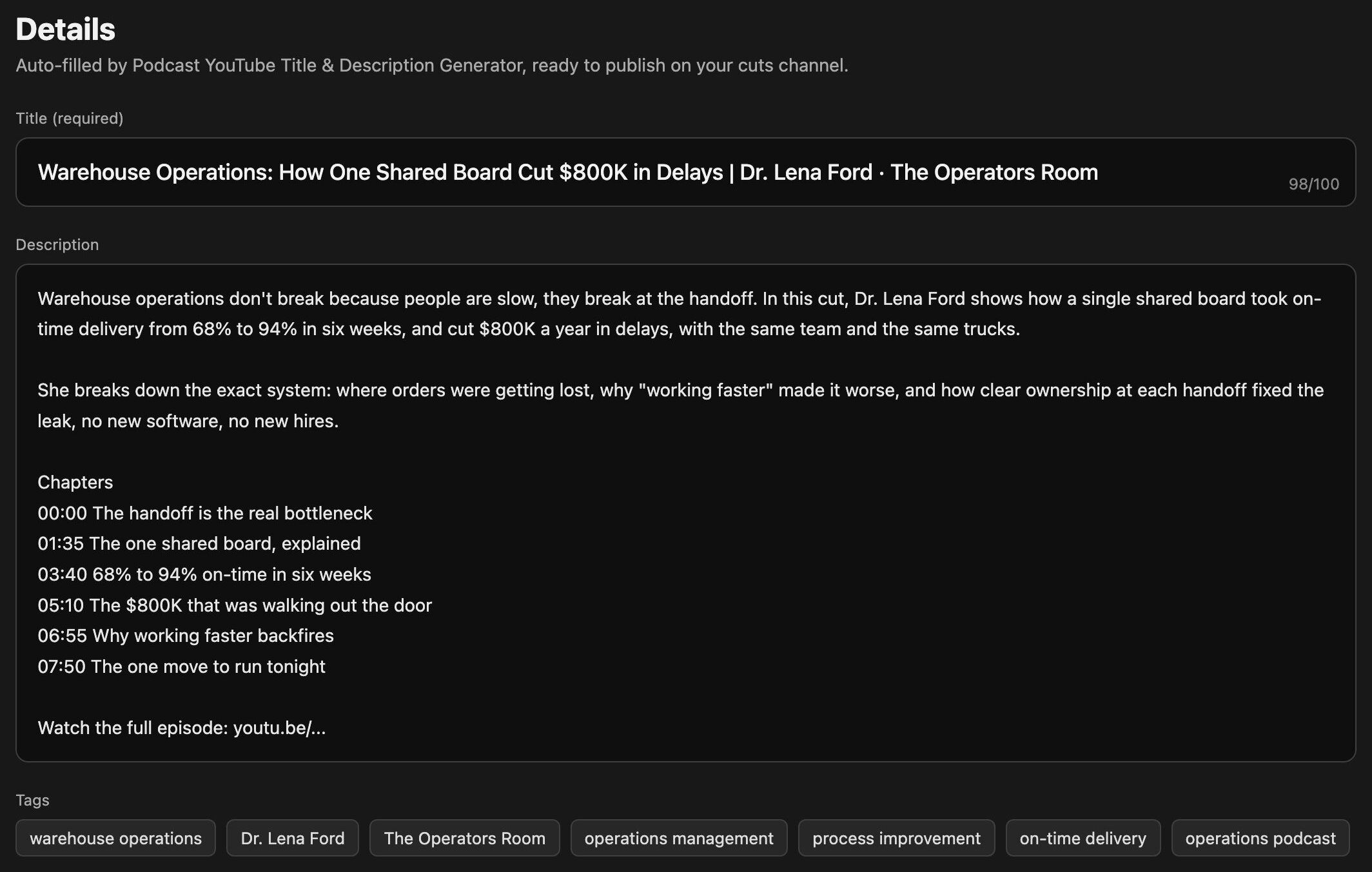
Publishing long cuts on a podcast cuts channel means writing a fresh title, description, chapters and tags for every block, the slowest part of running the channel. This YouTube title and description generator reads your long cuts and the episode's own words, then hands back a keyword-first title, a keyword-rich description with re-timed chapters and a link back to the full episode, a tags list and a bold thumbnail concept for each block. Built for podcast editors, creators and agencies who feed a cuts channel at scale.
- An SEO title for every long cut, keyword first, hook in the middle, guest and show at the end, under 100 characters.
- A keyword-rich YouTube description with a strong opening line, a 200 to 500 word body and 10 to 20 supporting keywords woven in naturally.
- Chapters re-timed to each block's window, first chapter at 00:00, so retention and search entry points come built in.
- A YouTube tags list, 5 to 8 per block, with the first three carrying the keyword, guest and show.
- A distinct, click-worthy thumbnail concept per block, a 3 to 5 word headline plus a literal scene that illustrates the title.
- A tidy upload sheet you or your tool paste straight into YouTube, plus a call on which cut to publish first.
- 1Drop it into your AI
Put the SKILL.md file in your skills folder (Claude Code, Cursor, Codex) or paste it as a custom instruction. No app, no account, no API key, no install.
- 2Give it your long cuts
List each 8 to 10 minute block, its start/end timestamp, its topic and where the media is, plus the guest and show names and the full-episode link. If anything is missing, the AI asks first, it never invents.
- 3It reads the episode's own words
It derives every title and description from your approved copy or the transcript, never reinventing the argument, never fabricating a quote, a stat or a name.
- 4It writes the SEO copy
For each block: a keyword-first title, a keyword-rich description with the opening promise, chapters re-timed so the first is 00:00, tags, and a Watch the full episode link at the end.
- 5It designs a thumbnail per block
A distinct 3 to 5 word headline and a literal, click-worthy scene that illustrates that block's title, never one concept reused across blocks. It can render it with your image tool or hand you the concept and specs.
- 6You approve the whole package
Every title, description, chapters, tags, thumbnail concept and the exact destination channel are shown for your OK. Nothing is published and nothing paid is spent until you approve.
- 7You choose where it lives
It asks where the media sits and whether to hand you an upload sheet or auto-publish through a tool you connect, always to the cuts channel, never the main one. Nothing hardcoded, no lock-in.
- Per-block SEO title: keyword-first headline, hook, guest and show, under 100 characters.
- Per-block YouTube description: keyword opening line, 200 to 500 word body, re-timed chapters (00:00 first), and a full-episode link.
- Per-block tags list: 5 to 8, first three carrying keyword + guest + show.
- Per-block thumbnail concept: 3 to 5 word headline + a literal scene, at 1280x720 with brand colors and safe-area specs.
- A clean upload sheet per block (title, description, chapters, tags, thumbnail, media, destination) plus a note on which cut to publish first.
Upload sheet (manual)
The default: a paste-ready title, description, chapters, tags and thumbnail concept per block that you upload yourself in the YouTube Studio.
Auto-publish (connected tool)
If you connect a publishing tool or API, it verifies the exact cuts channel and publishes each approved block as public, handing you the thumbnail PNG when the tool cannot set a custom one.
SKILL.md · README.txt · LICENSE.txt — Single-seat commercial use. Do not resell or redistribute the file. Compatible with Claude · Claude Code · Cursor · Codex.
What is a YouTube title and description generator?
A tool that writes an SEO-optimized YouTube title and a keyword-rich description for a video automatically. This one works on podcast long cuts, deriving each title, description, chapters and tags from the episode's own words so a cuts channel stays consistent and searchable.
Does it also work as a YouTube tags generator?
Yes. For every long cut it outputs 5 to 8 tags, with the first three carrying the main keyword, the guest and the show, on top of the SEO title and the description, so each upload is fully tagged.
Do I need to install anything?
No. It is a SKILL.md file you drop into your AI assistant (Claude, Claude Code, Cursor, Codex) and run. No app, no subscription, no API key. Plain chat AIs give you the upload sheet to paste in.
Can it make thumbnails for a podcast cuts channel too?
It writes a distinct thumbnail concept per block, a 3 to 5 word headline plus a literal scene that matches the title, and can render it with the image tool you name, or hand you the concept and 1280x720 specs to build it in the Studio.
An AI skill is a small, reusable instruction file (a SKILL.md) that teaches an AI assistant to do one job well. Podcast YouTube Title & Description Generator is exactly that: a Claude skill / AI agent skill you drop into your own assistant and run on demand, with no app, no subscription and no lock-in. You own the file forever.
It runs in Claude, Claude Code, Cursor, Codex and any assistant that reads a SKILL.md or a system prompt. Because it is just text, it is fully portable, and if it needs something to run, podcast youtube title & description generator asks you for it first instead of inventing.
Creators reach for it as a podcast clips AI and an AI podcast clip generator, to turn a podcast into Shorts and to pull podcast highlights automatically, finding the best podcast moments without scrubbing the whole episode.
- Download the file after checkout you get the SKILL.md plus a short README and your license.
- Add it to your AI drop SKILL.md into your skills folder (for example
.claude/skills/) or paste its contents as a custom instruction. - Run it ask your AI to use Podcast YouTube Title & Description Generator, give it what it asks for, and it does the work.
Get this skill plus every other one in a single agent bundle, ready to drop into your AI.


Ready to run Podcast YouTube Title & Description Generator?
Podcast YouTube Title & Description Generator
Takes the 8 to 10 minute long cuts from a podcast episode and packages each one for a YouTube cuts channel: an SEO title, a keyword-rich description with re-timed chapters and a full-episode link, tags, and a bold thumbnail concept.
SKILL.md (plain text, nothing runs on your machine) plus a README and your license.Checkout opens soon. Get early access and I will send you the link the moment it is live.
✓
You are on the list.I will email you the moment it is live.
