
"New Episode" Promo Stories, Written and Laid Out for You
An AI skill that turns a new episode into a ready-to-post 9:16 promo story, copy and layout done.
Writes the hook, benefit, guest credit and CTA for a new episode and lays them out as a ready-to-post 9:16 promo story around your episode thumbnail.
Any AI that reads a SKILL.md file: Claude, Claude Code, Cursor or Codex. No account, no API key, no install, just give it your episode details and thumbnail.
Works with







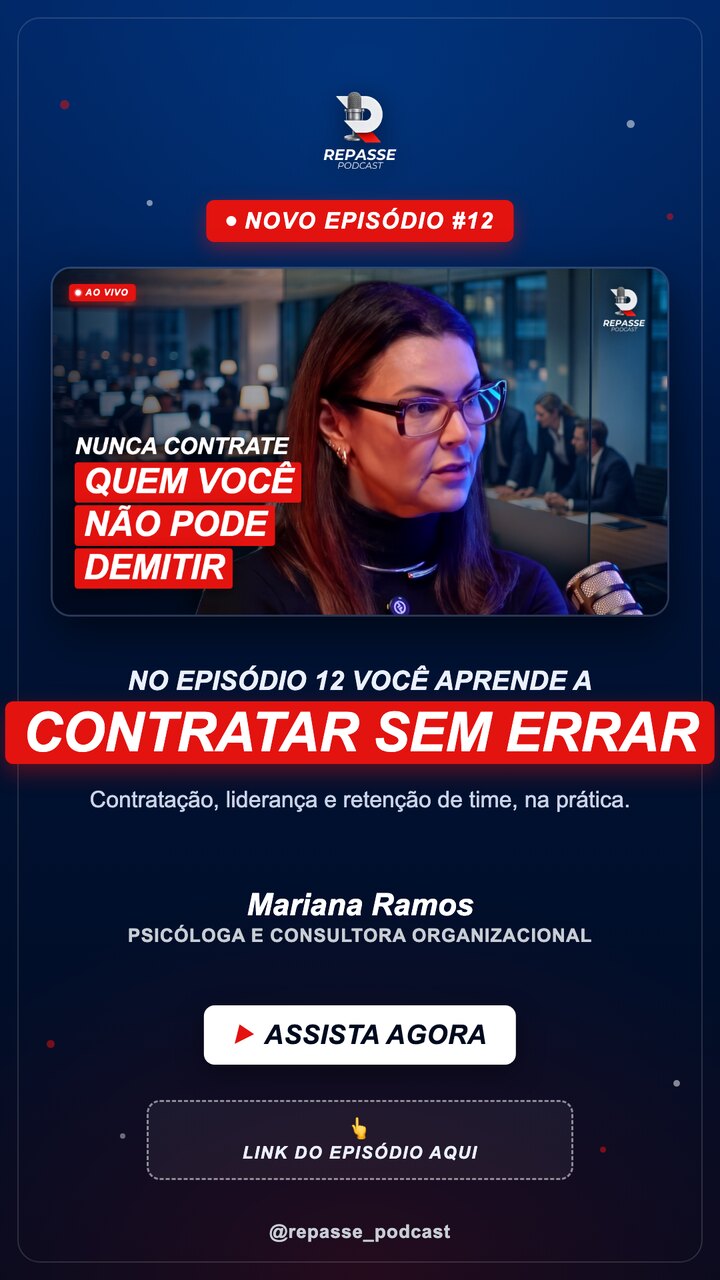
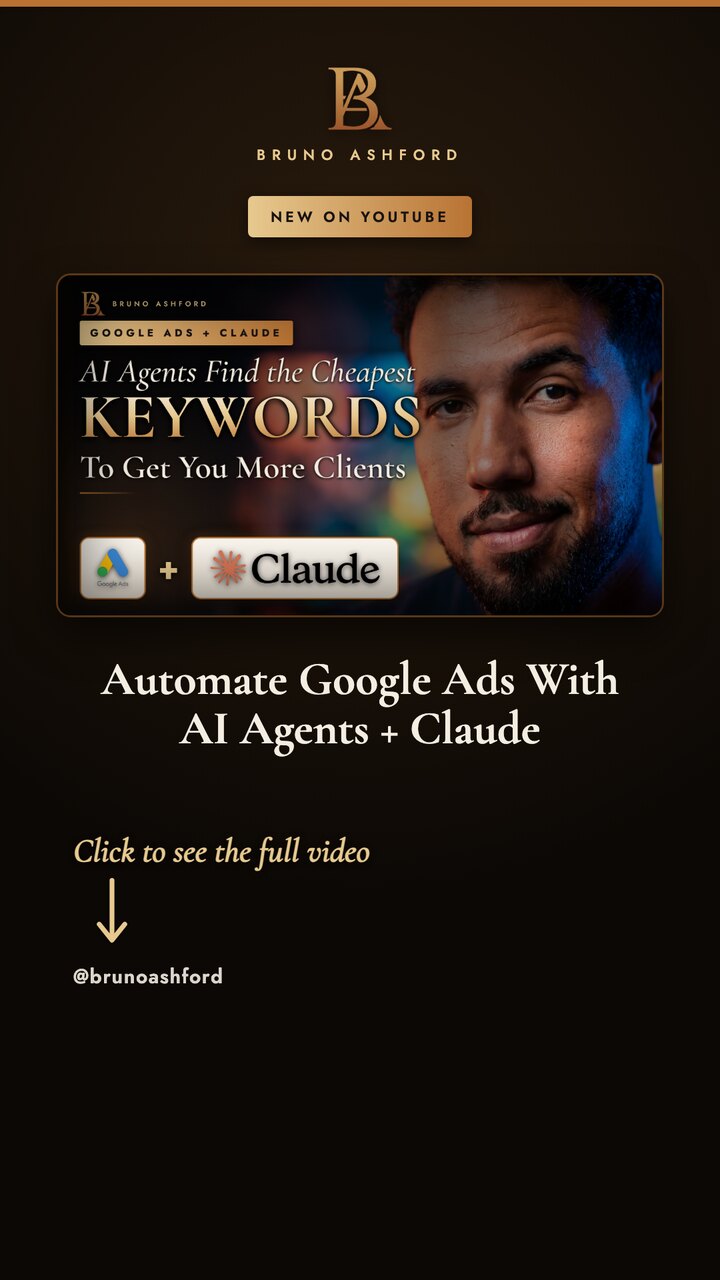
Every time an episode drops you need a promo story, and writing the hook, formatting the layout and lining up the thumbnail eats the launch. Podcast Promo Story does it in seconds: it writes the "new episode" hook, benefit line, guest credit and CTA, then drops them into a clean 1080x1920 instagram story template built around your episode thumbnail, with a reserved spot for the link sticker. Built for podcasters, editors and agencies who promote your podcast on Instagram Stories and TikTok and want a repeatable new episode promo without touching a design tool.
- A ready-to-post 9:16 promo story (1080x1920) for every new episode, sized for Instagram Stories, Facebook Stories and TikTok.
- Copy written for you: a two-line hook that shows the gain, a benefit line, the guest name and role, and a CTA.
- A clean instagram story layout around your episode thumbnail, with the NEW EPISODE #N badge and a reserved dashed spot for the link sticker.
- Your brand applied automatically: your podcast logo, colors, fonts and @handle (or a neutral theme if you have none).
- A self-contained HTML file plus a rendered PNG, no design tool, no CDN, no lock-in.
- Copy in the episode's own language, so a Spanish episode gets Spanish story copy.
- 1Drop it into your AI
Put the SKILL.md file in your skills folder (Claude Code, Cursor, Codex) or paste it as a custom instruction. No app, no account, no API key, no install.
- 2Give it the episode details
Episode number, guest name and role, the topic and the benefit, plus the episode thumbnail (path or URL). If you forget something, it asks first, it never invents facts about the episode.
- 3It writes the story copy
It writes a two-line hook that shows the gain of watching (not just the topic), a benefit line, the guest credit and the CTA, in the same language as your episode.
- 4It plans the instagram story layout
Logo on top, a NEW EPISODE #N badge, your episode thumbnail as the visual anchor, the hook, the guest credit, the CTA and a reserved dashed spot for the link sticker, on your brand.
- 5You approve the copy and layout
It shows the hook, benefit, credit, CTA and layout in chat and stops. Nothing is rendered until you say go, so the message and design are always yours.
- 6It builds and renders the story
It generates one self-contained HTML file at 1080x1920 (all styles inline, your thumbnail embedded) and renders it to a PNG with whatever image tool your setup has.
- 7You choose where it goes
It asks how to render the PNG and where to deliver or host it, and wires itself to your setup. Nothing hardcoded, no service or key baked in.
- A 1080x1920 promo story PNG for the new episode, ready to post to Instagram Stories, Facebook Stories and TikTok.
- A self-contained HTML story layout (one file, all CSS inline, thumbnail embedded) you can re-render or tweak.
- The written story copy: two-line hook, benefit line, guest name + role, CTA and the NEW EPISODE #N badge.
- A reserved dashed link spot marking exactly where to drop the native link sticker.
- A closing note with the strongest hook line and where to place the link on the story.
Guest episode story
A new-episode story built around the guest: name, role and the benefit of the conversation, with the guest photo or title frame as the thumbnail.
Solo episode story
A new-episode story for a host-only drop, hook and benefit forward, no guest credit, on the same 9:16 brand layout.
SKILL.md · README.txt · LICENSE.txt — Single-seat commercial use. Do not resell or redistribute the file. Compatible with Claude · Claude Code · Cursor · Codex.
What is this instagram story template for?
It is an AI skill that generates a 9:16 new episode promo story: it writes the hook and CTA and lays them out over your episode thumbnail in a clean instagram story layout, ready to post.
Do I need Photoshop or Canva to use it?
No. There is no design tool. It produces a self-contained HTML story and renders it to a 1080x1920 PNG using whatever image tool your AI has, then hands it over.
Can I use it to promote your podcast on TikTok too?
Yes. The 1080x1920 story works for Instagram Stories, Facebook Stories and TikTok, so you get one new episode promo you can post everywhere.
Do I need to install anything?
No. It is a SKILL.md file you drop into your AI assistant (Claude, Claude Code, Cursor, Codex) and run. No app, no subscription, no API key.
An AI skill is a small, reusable instruction file (a SKILL.md) that teaches an AI assistant to do one job well. Podcast Promo Story is exactly that: a Claude skill / AI agent skill you drop into your own assistant and run on demand, with no app, no subscription and no lock-in. You own the file forever.
It runs in Claude, Claude Code, Cursor, Codex and any assistant that reads a SKILL.md or a system prompt. Because it is just text, it is fully portable, and if it needs something to run, podcast promo story asks you for it first instead of inventing.
Creators reach for it as a podcast clips AI and an AI podcast clip generator, to turn a podcast into Shorts and to pull podcast highlights automatically, finding the best podcast moments without scrubbing the whole episode.
- Download the file after checkout you get the SKILL.md plus a short README and your license.
- Add it to your AI drop SKILL.md into your skills folder (for example
.claude/skills/) or paste its contents as a custom instruction. - Run it ask your AI to use Podcast Promo Story, give it what it asks for, and it does the work.
Get this skill plus every other one in a single agent bundle, ready to drop into your AI.

Ready to run Podcast Promo Story?
Podcast Promo Story
Writes the hook, benefit, guest credit and CTA for a new episode and lays them out as a ready-to-post 9:16 promo story around your episode thumbnail.
SKILL.md (plain text, nothing runs on your machine) plus a README and your license.Checkout opens soon. Get early access and I will send you the link the moment it is live.
✓
You are on the list.I will email you the moment it is live.
